Thursday, October 18, 2012

The Top 5 Social Media Management Tools for Small Business

The Top 5 Social Media Management Tools for Small Business
 
Managing your company’s social media presence is becoming an increasingly complex task. Small-business owners who used to rely on Twitter to post updates to LinkedIn, for instance, no longer have that option.
Fortunately, other tools allow you to manage your business’s assorted social media accounts from a single dashboard. We've selected the top five that are specifically geared toward small business. To make our list, each tool had to meet several criteria.
    The Top 5 Social Media Management Tools for Small Business
  • Affordability: The tool is either free or priced low enough to meet the budget of a one- or two-person business.
  • Scalability: The tool grows with your company's needs, even if you start with just one or two accounts.
  • Support for Facebook, LinkedIn, and Twitter: If a social media management tool doesn’t post to all three networks, it’s dead to most small businesses.
  • Update posting assistance: The tool allows you to schedule posts in advance.

HootSuite
The Top 5 Social Media Management Tools for Small Business 
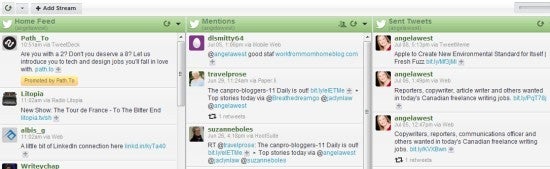
HootSuite's dashboard makes your social media profiles easy to navigate.If you've been around social media for any period of time, you've probably used HootSuite, the tool of choice for many social media professionals and small businesses. But the limitations of the free version (it supports only one user and five social profiles, for instance) mean that most businesses will grow to the point where the free version is no longer acceptable. Although HootSuite seems to have dealt with this problem by providing the option to upgrade to HootSuite Pro for unlimited profiles and more features, it's worthwhile to look around at other alternatives once your business starts demanding too much of HootSuite.
The free version does the job for microbusinesses with the standard Facebook, LinkedIn, and Twitter accounts to update, and HootSuite Pro will work for small businesses that don't need to support more than two users. If you find yourself needing more-robust analytics and other features, it's time to upgrade to another tool.
Cost: HootSuite is free for one user and up to five social profiles. HootSuite Pro, priced at $10 per month, includes two user accounts, unlimited social profiles, and other premium features. Larger businesses should check out HootSuite Enterprise.

VerticalResponse
The Top 5 Social Media Management Tools for Small Business 
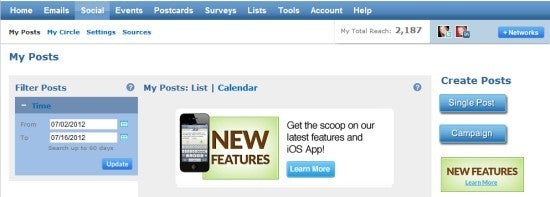
VerticalResponse lets you create single posts, email messages, and campaigns, and it ties the analytics for everything together.VerticalResponse launched VerticalResponse Social as a complete service for the small-business professional. It marries email and social media campaigns in a way that other tools aimed at small businesses do not. Usually people regard email and social media as separate islands, but bringing them together under the umbrella of one online marketing campaign makes much more sense. VerticalResponse tailors its products to the harried small-business person who knows how to run a company but is far from being a social media expert.
VerticalResponse Social schedules everything from single updates to entire campaigns up to 30 days in advance. It allows clients to set up their own custom content library of common websites for their industry, and it offers suggestions for content based on the nature of their business. The latter feature makes VerticalResponse attractive to people who could otherwise lose themselves in a bottomless time sink while searching out content on the Internet that’s relevant to their industry.
I spoke to Alex Chang, VerticalResponse’s VP of Social Platform. According to Chang, the chief advantage of VerticalResponse is that it was created for small-business professionals who think that they don't have the time for social media and are not tech-savvy. Regardless of your tech knowledge, the service's marriage of email and social media campaigns and its content-library creation feature are both huge timesavers, although the tool does feel pared down to users who are more technically inclined. Despite that minor quibble, VerticalResponse packs the most features in for the best price among the five services here, especially since it permits you to ditch any separate email newsletter service you've been using.

Sprout Social

The Top 5 Social Media Management Tools for Small Business 
Sprout Social offers comprehensive reports and an easy-to-use interface.Sprout Social's major advantages over other social media management tools lie in its user interface and in its detailed but easy-to-understand reports. I also like its ability to assign tasks to team members, as well as its "Smart Inbox," which collects all your social media messages (Twitter mentions and direct messages, Facebook mentions and messages, and LinkedIn messages) in an organized inbox that you can manage from one dashboard.
Sprout's feedback is also extremely useful. After you set up your account, it pulls together your follower demographics within 24 hours, and it tells you what you could be doing better. As an analytics junkie, I find this feature to be my favorite part of Sprout Social by far, but other users will appreciate how easy to navigate the Sprout tool is. Sprout's lack of a tie-in with email marketing is notable, especially if you've tried out VerticalResponse's tool.
Cost: The Small Biz plan, which supports up to 20 social profiles, costs $39 per month. The Deluxe plan includes a maximum of 40 social profiles and costs $59 per month. The Premium plan offers unlimited profile maintenance at a cost of $899 per month.

Sendible
The Top 5 Social Media Management Tools for Small Business

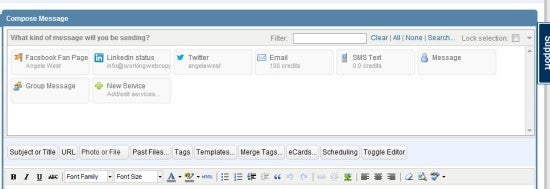
 Sendible lets you perform specific tasks with your social media accounts, such as posting to a LinkedIn Group or to your LinkedIn status.Sendible drills down on various tasks, giving you the choice of posting to your Facebook personal-page photo album, posting notes to your Facebook page or profile, posting items to a LinkedIn Group or your LinkedIn status, and so on. This attention to specific actions saves you a lot of time, and it makes Sendible's cost over other tools well worth the investment for businesses that use social media more aggressively.
Monitoring social media for business-relevant keywords and managing your social media presence are a natural fit, and Sendible has married the two tasks well, giving you the ability to create custom email alerts for key terms such as your company name. You can send email from within the tool, as well, although Sendible does not integrate email and social media into one comprehensive campaign as VerticalResponse does.
Google Analytics monitoring and basic social media analytics come with the Marketer package, which is all most small businesses need.
Cost: The Marketer plan includes up to 30 services for a fee of $30 per month. The Business plan covers a maximum of 80 services and costs $70 per month.

Postling

The Top 5 Social Media Management Tools for Small Business 
Postling's service lets you view all your social media messages in one simple inbox.Postling blends social media monitoring, posting, and reporting, but it also incorporates instant notifications for reviews of your business on TripAdvisor and Yelp, the two sites by which hospitality and restaurant businesses live and die. For any company involved in those industries, Postling is the obvious tool of choice. The inbox is similar to Sprout Social's in that it allows you to deal with all mentions and messages from one place.
Postling's pricing structure makes it ideal for businesses that want to maintain a pared-down social media presence. If you need the scalability to add many accounts in the future, it may not be the best choice given its per-account pricing.
Cost: Postling is $5 per month for five social media accounts, $3 per month for each extra account.

Different Tools for Different Businesses

Your choice of social media management tool depends on the nature of your business and how deeply involved you want to become with social media. If you don't consider yourself tech-savvy, or if you like the timesaving feature of a built-in content library, VerticalResponse might be appropriate. If you're working with a tight budget and you require fewer features, it's hard to beat the free version of HootSuite.
Sendible is the best option if you're looking to automate tasks and receive alerts when your business becomes a topic of conversation on social networks. If you're operating a service-oriented business, such as a restaurant or spa, and if you need real-time monitoring of TripAdvisor and Yelp, check out Postling.
Each of the paid tools I've discussed here offers a free trial (except for Postling, which charges $1 for a trial), so you risk little in trying them to find the one that best fits your business's needs.
Angela West is still waffling about which of these paid tools she'll upgrade to. Copywriter by day, she specializes in making website copy easy to read. Follow her on Twitter (@angelawest) or check outher Facebook pagefor a compilation of all of her PCWorld Business Center posts.
Ref:
Pcworld

How To Add A Live Facebook Timeline Feed To Your iPhone’s Lock And Home Screen

When it comes to mobile smartphones and the operating systems that power them, there is always going to be a great divide from users who prefer one platform over the other. We all know that the two largest mobile OSes in the game are iOS and Android, with each one having its own set of pros and cons when compared against the other. Apple fans will argue that iOS is a more powerful and intuitive OS, whereas Android fans love the control they have over their devices as well as the ability to have live widgets on their home screens.
I can’t argue with the benefits of widgets, as they do – in some cases – provide some great additional interactivity with the device, but the more experienced will know that jailbreaking an iOS device opens the system up to a whole world of powerful widgets. With that said, the Facebook Live Widgets package that has just landed in the Cydia store is an attempt by Bluemetal to bring some dynamic social network type functionality to the home screen and lock screen of a jailbroken iPhone or iPod touch. iOS is one of the largest mobile platforms in the world and Facebook is the king of the social networks, so what could possibly go wrong?

LiveWidgets1
The new tweak is essentially a package that contains three individual widgets which allow the user to interact with Facebook and their timeline in a way that isn’t possible on a standard installation of iOS. The first two widgets are intended for use on the device’s home screen and differ only in their size. The physical dimensions of the widgets are designed to allow the user to either have two or three rows of app icons as well as the widget itself.
The third and final widget is intended for use on the device’s lock screen and commands the full available screen real-estate between the clock at the top of the display and the slide to unlock image at the bottom. In terms of functionality, all three widgets are the same and offers live streaming from the inputted Facebook account. After installation, the widgets need to be activated through the WinterBoard app and are refreshed automatically, and scrollable. One thing to consider when using these widgets is the possible additional drain on the device’s battery, considering they are always refreshing.
LiveWidgets2
The Facebook Live Widgets package is available as a $0.99 download from the ModMyi repository with no specific mention of iOS version requirements.
Be sure to check out our iPhone Apps Gallery and iPad Apps Gallery to explore more apps for your iPhone and iPad.
Ref:
Reimondpie

4 Things Apple Will Eliminate With iPhone 5 and iOS 6

 
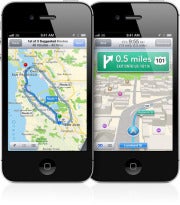
New Apple iOS 6 mapsNew Apple iOS 6 mapsApple bought several mapping companies to produce its own mapping product – replacing the Google Maps-powered Maps app. The main difference between Apple’s and Google’s maps products is that the first uses resolution independent vector maps, while the latter uses layered images for each zoom level. The advantage to Apple’s solution is that you don’t have to wait for blocks to load as you zoom in, because maps are being rendered live on the phone, which gives you a smoother experience.
Like Google Maps for Android, Apple is introducing in its iOS 6 Maps app 3D buildings and turn-by-turn (voice) navigation, but there will be one main thing missing: Google's Street View, which Apple’s app doesn’t feature. Google already has the Earth app for iOS, so it’s entirely possible the company would release a standalone Google Maps app in the App Store, just like it said it would with another soon-to-be-gone iOS app: YouTube

Sayonara YouTube

YouTube for iOS 
YouTube for iOSYouTube is the latest Apple-Google collaboration to be spiked from iOS, Apple confirmed. The video-watching app dates from the early days of iOS, and there simply won’t be one offered with iOS 6 by default. Instead, Google said it is developing its own YouTube iOS app, to be launched in Apple's App Store at a later date.
The lack of a YouTube app probably won’t make a big difference to users. You will be able to watch YouTube clips straight from Safari on the mobile version of the site, instead of having a link open automatically in the YouTube app automatically.
In developing its own YouTube app, Google will also have the ability to introduce advertisements in the app (something not present in the current app), and also update the app with new features more often. In Apple’s hands, the YouTube app has seen very little improvements over the years.

Adieu 30-Pin Dock Connector

Apple's older 30-pin connector 
Apple's older 30-pin connectorThe next-generation iPhone is expected to have a 19-pin dock connector, a change that could disrupt the accessories market that caters to the 30-pin connector currently found on the iPhone. The current 30-pin connector has been around since the first iPods, and Apple needs a smaller connector in order to make the new iPhone thinner and to incorporate a 4G radio.
However, moving to a new and smaller dock connector won’t be without its problems. While accessory manufacturers slowly start adopting the new plug as new iPhone sales grow, Apple is expected to introduce an adaptor that would make the new iPhone (and later iPads) compatible with the old-style adaptors. However, the new dock connector should also make people less reliant on using wired accessories and push sales of AirPlay-compatible accessories.

Arrivederci microSIM

iPhone 5 probably will use a smaller SIM card 
iPhone 5 probably will use a smaller SIM cardAnother change designed to leave more space inside the new iPhone for components is a smaller SIM card, reports French site nowhereelse. Smaller, you say? Yes nanoSIMs are around 40 percent smaller than the microSIM cards introduced with the iPhone 4 (they measure just under one-half of an inch by 0.35 of an inch by 0.03 of an inch. Apple proposed this new standard over competing proposals from Nokia and Motorola, and the new design will offer the same functionality as current SIM cards.
While the smaller SIM card might make a difference for Apple’s internal iPhone design, for users the transition should be quite straightforward. The nanoSIM can be packaged and distributed in a way that is backwards compatible with existing SIM card designs.
Ref:
Pcworld
How to Share Personal Data While Keeping Secrets Safe

How to Share Personal Data While Keeping Secrets Safe 
 
A new technique could help companies like Facebook make money from your data without putting it at risk.
Giant stockpiles of personal data, whether Web browsing logs, credit-card purchases, or the information shared through social networks, are becoming increasingly valuable assets for businesses. Such data can be analyzed to determine trends that guide business strategy, or sold to other businesses for a tidy profit. But as your personal data is analyzed and handed around, the risk increases that it could be traced back to you, presenting an unwelcome invasion of privacy.

A new mathematical technique developed at Cornell University could offer a way for large data sets of personal data to be shared and analyzed while guaranteeing that no individual's privacy will be compromised.
"We want to make it possible for Facebook or the U.S. Census Bureau to analyze sensitive data without leaking information about individuals," says Michael Hay, an assistant professor at Colgate University, who created the technique while a research fellow at Cornell, with colleagues Johannes Gehrke, Edward Lui, and Rafael Pass. "We also have this other goal of utility; we want the analyst to learn something."
Companies often do attempt to mitigate the risk that the personal data they hold could be used to identify individuals, but these measures aren't always effective. Both Netflix and AOL discovered this when they released supposedly "anonymized" data so that anyone could analyze it. Researchers showed that both data sets could be de-anonymized by cross referencing them with data available elsewhere.
"In practice, people are using fairly ad-hoc techniques" to protect the privacy of users included in these data sets, says Hay. These techniques include stripping out names and social security numbers, or other data points. "People have crossed their fingers that they are providing true protection," says Hay, who adds that data mavens at some government agencies fear lawsuits could be filed over improperly protecting data for privacy. "I know in talking with other people at statistical agencies where they said we're worried about being sued for privacy violations."
In recent years, many researchers have worked on ways to mathematically guarantee privacy. However, the most promising approach, known as differential privacy, has proven challenging to implement, and it typically requires adding noise to a data set, which makes that data set less useful.
The Cornell group proposes an alternative approach called crowd-blending privacy. It involves limiting how a data set can be analyzed to ensure that any individual record is indistinguishable from a sizeable crowd of other records—and removing a record from the analysis if this cannot be guaranteed.
Noise does not need to be added to a data set, and when a data set is sufficiently large, the group showed that crowd-blending comes close to matching the statistical strength of differential privacy. "The hope is that because crowd-blending is a less strict privacy standard it will be possible to write algorithms that will satisfy it," says Hay, "and it could open up new uses for data."
The new technique "provides an interesting and potentially very useful alternative privacy definition," says Elaine Shi, an assistant professor at the University of Maryland, College Park, who is also researching ways to protect privacy in data sets. "In comparison with differential privacy, crowd-blending privacy can sometimes allow one to achieve much better utility, by introducing less or no noise."
Shi adds that research into guaranteeing privacy should eventually make it possible to take responsibility for protecting users' data out of the hands of software developers and their managers. "The underlying system architecture itself [would] enforce privacy—even when code supplied by the application developers may be untrusted," she says. Shi's research group is working on a cloud-computing system along those lines. It hosts sensitive personal data and allows access, but also carefully monitors the software that makes use of it.
Benjamin Fung, an associate professor at Concordia University, says crowd-blending is a useful idea, but believes that the differential privacy may still prove feasible. His group worked with a Montreal transportation company to implement a version of differential privacy for a data set of geolocation traces. Fung suggests that research in this area needs to move on to implementation, so crowd-blending and other approaches can be directly compared—and eventually put into practice.
Hay agrees that it's time for the discussion to move on to implementation. But he also points out that privacy protections won't prevent other practices that some people may find distasteful. "You can satisfy constraints like this and still learn predictive correlations," he points out, which might result, for example, in auto insurance premiums being set based on information about a person seemingly unrelated to their driving. "As privacy guaranteeing techniques are adopted, it could be that other concerns emerge."
Ref:
TechnologyReview

How to Maximize Battery-Life While Traveling

How to Maximize Battery-Life While Traveling
If you take an iPhone, iPad, or MacBook along when you travel, you know how much of a challenge it can be to keep your device powered up. Here are a few tips.
Admit it: Your carry-on bag is stuffed full of digital gear you can’t bear to leave at home. Not only will your iPhone, iPad, or MacBook keep you entertained while en route, they’ll make great navigation, research, and photo tools once you’ve reached your destination. But keeping these devices charged up when you’re constantly on-the-go or stuck in the air can be a challenge. But there are a few things you can do to extend battery life and save power.

Battery cases

Mophie Juice Pack for iPhone 
Mophie Juice Pack for iPhone
A battery case for your iPhone is a great accessory to keep in your carry-on. These cases add extra battery life to your iPhone while also keeping it safe from the occasional drop and bump. Most of these cases sport dock-connector plugs that pair up with the iPhone’s 30-pin port, which is how they deliver the juice to your iPhone. The only downside is that you can't use any dock-cradle accessories without removing the iPhone from the case.
One of our favorite battery charging cases is the Mophie Juice Pack Plus (). It just about doubles your iPhone’s battery life, doesn’t add too much extra weight, and you can still sync your iPhone using the included USB-to-Micro-USB cable. Plus, it has an on/off switch, which lets you control when the case sends juice to your phone.
Sol’s Solar-Powered Charging Case () is another solid option which provides a few different charging options: you can charge your phone using the sun’s rays, bright indoor lighting, or via USB. If you’re lounging on the beach without an outlet in sight, it'll keep your iPhone juiced.
There are also external battery cases for the iPad, which is great if you plan on watching videos while on an airplane. MiPow’s Juice Book is a folio-style leather case with one of MiPow's Power Tubes embedded in the case’s spine. This Power Tube provides 6600mAh to boost the iPad’s battery life when it gets low—just plug it in to your iPad’s dock-connector port when you need more juice, and unplug it when you’re done. The Power Tube can charge your iPhone or iPod, too.

Pack one charger

Bring your iPad's 10-Watt USB power adapter to charge your iPad and iPhone 
Bring your iPad's 10-Watt USB power adapter to charge your iPad and iPhoneIt isn't necessary to bring the two chargers that came with your iPhone and iPad; save space by bringing just the one that came with your iPad. Visually, the iPad charger is bigger, with prongs that can be pushed in and pulled out of the square body, similar to that of a MacBook; the iPhone charger is smaller, and the prongs are not retractable.
The iPad and iPhone wall chargers also supply different power levels. Since the iPad has a heftier charging requirement than the iPhone, it has a heftier power adapter—a 10-Watt USB power adapter, compared to the iPhone’s USB power adapter, which has an output of 5 watts. You can use the iPhone’s adapter for your iPad, but it will take significantly longer to reach a full charge, especially if you have a third-generation iPad.
If you’re traveling with your MacBook as well, consider the TwelveSouth PlugBug. It attaches to your MacBook’s power brick and allows you to charge a USB device (like your iPhone or iPad) while charging your laptop at the same time.

Battery saving apps

For your MacBook or MacBook Air, you can use a battery-monitoring app to keep a closer eye on your energy supply. Some of them, such as Low Battery Saver (), let you customize your Mac’s battery warnings. That way, you’ll have more of a heads up on how much battery life remains.
Deep Sleep is another handy app which “hibernates” your MacBook instead of just putting it to sleep when you close the lid while it’s still powered on. (Even in sleep mode, your Mac draws power from the battery.) The utility saves the contents of RAM to your hard drive and stops drawing any power at all from the battery when your MacBook is not in use. It takes a little longer for your Mac to wake up from hibernation, but all of your apps and documents will be restored just as you left them, and your battery will be less taxed.

Check your settings

Saving your battery's charge can be as simple as tweaking some settings on your iPhone, iPad, or MacBook.
For your iPad or iPhone:
∙ Turn off Wi-Fi and 3G when you’re not using them. Go to Settings -> Wi-Fi, then toggle the switch to Off. Same goes for Bluetooth: turn it off if you’re not using it. Go to Settings -> General -> Bluetooth, and toggle the switch to Off.
∙ Turn off, or limit, your data push-notifications from your other apps. You’ll have to do this manually for each app. Go to Settings -> Notifications, then tap each app that you’d like to adjust and toggle Notification Center switch to Off.
∙ Turn off location services completely. This will save a lot of power, not to mention some money if you’re traveling internationally. Go to Settings -> Location Services, and toggle the switch Off.
∙ Use the Auto-Brightness feature. It's found in Settings -> Brightness & Wallpaper. Auto-Brightness will automatically adjust your screens’ brightness based on ambient light conditions. Manually lowering the screens’ brightness yourself can also extend battery life.
∙ Don't let it get too hot or too cold. Apple recommends keeping your device between 32 and 95 degrees Fahrenheit. So if you’re traveling anywhere with extreme temperature conditions, consider leaving your iPad or iPhone somewhere that's insulated from the ambient temperature.
(For more battery-saving tips, see Apple's own battery guide.)
Adjust the graphics setting in the Energy Saver preference to save some juice.  
Adjust the graphics setting in the Energy Saver preference to save some juice.
If you're using a MacBook—or, more specifically, if you're running OS X Lion on a 15- or 17-inch MacBook Pro—go to the Energy Saver pane in System Preferences. There you'll find a checkbox for Automatic Graphics Switching. Check this box—if it's not checked, the Mac will always use the faster graphics processor, which uses more power.
You should also adjust your brightness by dimming the screen as much as you can. A dim screen will help you maximize battery life, but you need to make sure you can still comfortably see your display. Also, turn off AirPort and Bluetooth when you’re not using them, and make sure you don’t have any programs running in the background: Quit all apps, disconnect peripherals, and eject discs in your disc drive if you’re not using them.
Ref:
Pcworld

5 Things Windows 8 Can Learn from OS X Mountain Lion

Apple's newest iteration of its OS has some great features we'd like to see in Microsoft's upcoming Windows 8. Here's our list.
Apple's OS X Mountain Lion will launch Wednesday, so it's a good time for Windows users to peer across the border at what features in Mountain Lion might prove useful.
Note that Windows 8 is a complete overhaul, while Mountain Lion is more of a refinement. Yet the Apple update adds lots of new features that would fit in nicely on Microsoft's OS. In hopes of keeping alive the tradition of stolen OS features, here are five aspects of OS X Mountain Lion that we'd like to see in future versions of Windows.

Notification Center

Notification Center in OS X Moutain Lion 
Notification Center in OS X Moutain LionWindows 8 will have pop-up notifications that slide onto the top-right corner of the screen, which are useful for noticing new messages, calendar appointments, or other important updates.
But Windows 8's notification system is still missing a list view for all the updates you might have missed, similar to Notification Center in Mountain Lion. This would be especially helpful if you didn't want pop-ups to interrupt your work, but still want to glance at a list view of notifications periodically.

AirPlay Mirroring

Microsoft knows that PC-to-TV connectivity is going to be huge, which is why the company will release a SmartGlass app that lets tablets send content to Microsoft's Xbox 360. Still, we know very little about how this app will work.
Meanwhile, OS X Mountain Lion will allow full AirPlay mirroring to Apple TV boxes. It'd be nice to have similar mirroring capabilities between Windows 8 PCs and the Xbox.

Text Messaging

Although Mountain Lion users won't be able to send and receive all their text messages on the Mac, they will have access to all iMessages, which come from other iOS and Mac users.
Microsoft could offer even deeper message syncing between Windows Phones and PCs, so users wouldn't have to answer messages on a tiny screen when they're at a full-sized computer.

Synced Notes and Reminders

The Windows Store will likely offer several third-party notes and reminders apps that can sync data across devices.
With Mountain Lion, these features are built in, so your notes and reminders are automatically available on any Apple device. Sure, Microsoft has a more advanced note-taking product in OneNote, but a more simple--and free--solution as part of Windows 8 would be helpful.

Easier Voice Dictation

In Windows 8, voice dictation is available as an accessibility feature, and as such, it's buried behind several menus and not intended for general use.

Mountain Lion makes voice dictation easy to use from any application--you just press the Function key twice, and start talking.
Ref:
Pcworld
Holiday Tech: Droolworthy Gear Coming This Fall

Ultrabook laptops, games, and HDTVs are likely to be hot this holiday season. And it's not too early to prepare for Black Thursday. Here's the lowdown. You're still slathering on sunscreen, and the dog days of summer (by ancient reckoning) arrived less than two weeks ago; but the most tempting HDTVs, Ultrabooks, games, and smartphones for the impending holiday season are already coming into focus.
What's going to be hot this winter? Will retailers slash prices on Windows 7 laptops as they push newly arriving Windows 8 PCs? What pricing gimmicks will they try? What's going to be the big thing with HDTVs, games, and cameras?

We talked with experts around the country to find out what great technology will be available in a few months, when deals are sure to be spectacular, and what newer tech will reach stores in time for you to slap a bow on it. Here's what we found.

The Hottest Products


Mobile connected devices--smartphones and tablets--will be the hottest things going, followed by Intel-powered Ultrabooks and other laptop computers running the new Microsoft Windows 8 operating system, according to Steve Koenig, director of industry analysis with the Consumer Electronics Association.
This year's refresh of the iPhone will likely be on the scene, too, and it will undoubtedly be a hugely popular gift again this year. Scads of 4G Android smartphone alternatives, as well as handsets running the new Windows Phone 8 OS, will vie for consumers' attention, too.
Your tablet choices will include everything from the budget Google Nexus 7 tablet to the as-yet-unpriced Microsoft Surface RT, along with countless rivals from other manufacturers.
Amazon may try to make a play again this year for holiday tech purchases. According to rumor, the company may launch a second-generation Kindle Fire with a larger 8.9-inch display in time for the holiday shopping season.
More than 140 Ivy Bridge-based Ultrabooks are in the pipeline; of those, more than 40 will be touch-enabled, and a dozen will offer convertible, swiveling-screens. These touchscreen Windows 8 models will bring the tapping and swiping experience from tablets to laptops.
"Touch-enabled systems will be key for Windows 8 sales; and convertible systems, combining the best of a notebook and a tablet, are clearly where the industry is headed," Koenig says.

Gaming

 
Gaming consoles and games are perennial favorites with holiday shoppers. This year Nintendo is looking to reclaim lost market share with two new pieces of gaming hardware: the 3DS XL and the Wii U. The former is a bigger and brighter version of the Nintendo 3DS handheld console.
For its part, the Wii U will blend game play between its DS-like touchscreen controller and your TV screen. The Wii also features motion-sensitive game play, streaming media support, and social gaming connectivity.
You shouldn't plan on seeing a Sony PlayStation 4 or a Microsoft Xbox 720 this season, however. Sony's current console is hard to improve on at this point, and Microsoft's new console is unlikely to arrive until late next year.
New Super Mario Bros. U for the Wii U 
New Super Mario Bros. U for the Wii UAs for new games, Bob McKenzie, GameStop's senior VP of merchandising, says that Madden NFL 2013, which comes out on August 28, looks to be the best one yet.
Other games that McKenzie think will excite gamers appear in the charts below.

Anticipated Games for Multiple Platforms

GAMERelease date
Borderlands 2 September 18
FIFA 13 September 25
Just Dance 4 October 9
Resident Evil 6 October 2
Pokemon Black Version 2 and Pokemon White Version 2 for Nintendo DS October 7
Skylanders Giants Octobr 21
Assassin's Creed III October 30
Halo 4 November 6
Call of Duty: Black Ops 2 November 13

Anticipated Nintendo Wii U Games

GAMEMaker
New Super Mario Bros. U Nintendo
Lego City: Undercover Nintendo
Ninja Gaiden 3 Nintendo
ZombiU UbiSoft
Batman Arkham City Armored Edition WB Games
Scribblenauts Unlimited WB Games

Anticipated PC Games

GAMERelease Date
Guild Wars 2 August 28
Borderlands 2 September 18
World of Warcraft: Mists of Pandaria September 25
Call of Duty: Black Ops 2 November 13
"Also, when Nintendo announces the release date for Wii U, there are many exciting games that will ship for this new platform. There are also many accessories for Wii U that will be popular with gamers and gift givers for holiday 2012," McKenzie says.

HDTVs

Vizio M3D470KD smart HDTV 
Vizio M3D470KD smart HDTVTelevisions are another popular item during the holidays, less as presents than as bargain electronics at that time of year.
According to Gartner principal analyst Paul O'Donovan, the big thing this year will be Smart TVs, which can connect to the Internet via broadband. These HDTVs also can draw a wide range of content from sites such as Netflix and YouTube, and let you download everything from games to Google Maps.
"These smart TVs will be able to be controlled from Android-based smartphones and tablets," O'Donovan says. "For some models, you can share content from your smartphones or tablet or even laptop on your smart TV wirelessly. [On] some you can use your mobile device like a wireless games machine controller, and play a video game on your smart TV."
O'Donovan says that LG, Samsung, and Vizio are developing a number of smart TV apps, and he expects that most TV manufacturers will offer a range of smart models.

Cameras

During past holiday shopping seasons, consumers tended to stock up on cheap point-and-shoot devices that sold for less than $100. This year will be different, experts say.
"The camera market has really become a very specialized device market, and a lot of that has to do with the fact that consumers are using smartphones to capture and share pictures and aren't really printing [photos] anymore," says IDC research analyst Chris Chute. "Cameras as a stand-alone device have sort of fallen by the wayside in that aspect…. [Sales are] declining about 15 percent year over year."
Canon EOS M 
Canon EOS MWhat will be hot, according to Chute, are more-expensive interchangeable-lens digital cameras, such as the Canon EOS M, which will debut in October. Other probable beneficiaries of the predicted trend include Sony NEX cameras, Nikon 1 models, the Panasonic GF line, the Olympus PEN line, and the Samsung NX line.
Though these devices resemble point-and-shoot cameras in their compactness, their capabilities put them closer to the professional category. As a result, they're far more expensive than point-and-shoots; the Canon EOS M, for example, will cost about $800.
"As for digital SLRs, these are perennial holiday favorites, ever since Canon introduced the first sub-$1000 model close to 10 years ago. These days, users are often buying their second or third DSLR, and often upgrade to more-expensive models," Chute says, adding that the Canon EOS 5D Mark III and Nikon D800 will be particularly popular with buyers.
To ease the sticker shock, he says, vendors are likely to dangle generous rebates that reward buyers for choosing packages offering, for instance, a $200 rebate to customers who buy two lenses.
The best camera deals are usually online, if you know what you want and don't need to feel the camera in your hand before buying it.
"The more expensive the camera, the more research goes into it, and the more forums become important where there are impartial reviews and user comments," Chute says. "Then, from there on in, usually it's a question of buying through Amazon."

Repercussions from Windows 8

Windows 8 
Microsoft's new OS will cause a major upheaval in the entire tech scene when it appears at the end of October. For one thing, you can expect incredible deals on Windows 7 PCs, if you can still find them.
"Inventory levels are so tightly controlled these days that there's probably not going to be too much overhang; and whatever overhang there is, Microsoft is going to give you a very low-cost if not free upgrade path to Windows 8," Koenig says.
In addition, consumers are likely to be inundated with Windows 8 promotions.
"This is a big deal for Microsoft, certainly with the Metro interface and what they're trying to do with their play in tablets," Koenig says. "Microsoft just had their first quarterly loss since the '80s, [which] underscores what's going on there, and the stakes are high. Microsoft needs to make Windows 8 successful; they really can't afford another misstep like they've had with some of their other operating systems in the past."
Windows Phone 8 
Windows Phone 8You might imagine that the Windows Phone operating system is dead in the water, but such thinking underestimates the connection that people may make between the Metro interface on their desktop or tablet, and the one they can get on their smartphone.
"They're going to start promoting [Windows Phones] to connect the two in consumer's minds," Koenig says. "And it would probably happen from the phone side; so if you get a Windows Phone, you can also get a Windows 8 tablet, just as an example. This makes sense because carriers like AT&T are starting to offer more shared data plans across devices."

Bundles and Layaway

The safest bet of the coming season: You'll see bundles everywhere.
Koenig says that layaway is making a comeback, and that you're likely to see better deals this year than ever before. But the trick of this marketing model is to get you to walk away with more in your cart that you anticipated.
"This holiday we'll probably see more of these uber-bundles [such as, if you buy] a 55-inch TV, you get a 40-inch TV of the same brand and type for free," Koenig says.
Also look for total family computing bundles that offer a smartphone, a computer, and a tablet for one price.

The Endless Black Friday

 
If you plan to get up before dawn on the day after Thanksgiving to brave the throngs of aggressive shoppers competing for the best deals, you may have to forgo sleeping altogether. Every year, the stores seem to open earlier.
"It used to be that they opened at 6 a.m. on Friday, and then it was 4 a.m., and then it was midnight madness. If you go earlier than midnight, you're into Thursday, so we're expecting to see some of that," Koenig says.
Koenig also notes the Pavlovian effect that Black Friday has on some people: Because they associate the date with red-hot deals, they tend to view retailers' Black Friday offerings as terrific bargains even when they're not. Sellers of every stripe have noticed and are responding by stretching their window for "Black Friday specials" to encompass first the whole Thanksgiving weekend, then a full week around it, and in some instances even the entire month of November.
Ref:
Pcworld

How Did Apple Allow Hackers to Access iCloud Account?

How Did Apple Allow Hackers to Access iCloud Account? 
The Internet is abuzz this weekend as a result of the Gizmodo Twitter account getting hijacked. That incident was traced back to the hack of an Apple iCloud account--allegedly accomplished through social engineering.
A Forbes.com story from Adrian Kingsley-Hughes explains that a former contributor for Gizmodo, Mat Honan, was the original victim of the attack. Hackers were able to access Honan’s iCloud account, and remotely wipe his iPhone, iPad, and MacBook. The original theory was that the hackers used a brute force attack to crack Honan’s iCloud password, but further investigation revealed that social engineering was used to convince Apple the attackers were Honan, and Apple gave them the keys to walk right in.
 
It took me months to "social engineer" my way into my own Apple ID account.Color me incredulous!
Why? Well, I have my own story of Apple woe--and it’s the exact opposite experience. I somehow lost access to my own email address for use on iTunes, iCloud, and other Apple services, and it took months of fighting with Apple Support to finally get to the bottom of things and get into my own account. I couldn’t get Apple Support to give me access to my own account, never mind someone else’s.
I had originally set up my Apple ID using my primary email address. I didn’t have any problem for months, maybe even years. Then, one day it simply wouldn’t work. The Apple system claimed it was already in use on another Apple ID account.
I assumed I’d been hacked somehow. It’s my email address. I own the domain. Nobody else could possibly use my email address with a different Apple ID account “on accident”.
Initially, Apple Support directed me to just use a different email address. I did that as a temporary solution to enable me to access iTunes and other Apple services, but it was a Gmail address that I created just for that purpose. I don’t use Gmail, and I had no intention of starting, so I was still determined to get my own email address back.
In my experience, Apple security was almost too tight. I tried repeatedly to reset the password for my email address, but the reset confirmation emails never arrived. The reason? The confirmation emails are sent to an emergency rescue backup email address. I had no idea what account was using my email address, so I had no way of knowing where those emails were being delivered.
No problem. You can also verify your identity to reset your Apple ID by answering security questions. The first one--the gateway to get to the actual security questions--is your date of birth. I entered my date of birth, and the Apple system told me I was wrong…about my own date of birth.
Every time I’d contact Apple Support I would get the same default answers, and “solutions” that wouldn’t work. Apple Support would explain that my email address was already in use on another Apple ID account, and that until it was removed from that account I’d be unable to use it.
Exasperated, I’d explain again that I can’t remove the email address from the Apple ID account because I had no idea what the Apple ID account was, or how to access it. Eventually, I’d become frustrated and quit. After a month or two, I’d contact Apple support and try again.
After many conversations and attempts, I finally had a breakthrough…sort of. An Apple Support person “cracked” and gave me an email address of the Apple ID associated with my email address. It was my wife’s. However, we logged in to her Apple ID account to remove my email address and found no sign whatsoever of it being there.
Once again, I contacted Apple Support. I explained that I can prove it’s my domain, and I can prove it’s my email address, and I asked that my case be escalated to someone capable of simply deleting my email address from the other Apple ID forcibly. Then I was told it was actually attached to, or associated with four different Apple IDs, but Apple couldn’t do what I asked. I wasn’t pleased.
I got my email address back. After over a year of attempts, and probably seven or eight different sessions with Apple Support, one of them finally “slipped” and gave me a crucial bit of information. It turned out that I was the one who stole my own email address.
Security 
Apple is obviously not invulnerable, but it doesn't make it easy to get into an account.The email address was associated with an Apple “me.com” address. Two of them, actually--and they were both mine. I never saw the reset confirmation emails because I’ve never actually used the “me.com” email addresses and I wasn’t set up to receive the messages. The date of birth verification and account security questions wouldn’t work, because I never set them up in the first place.
I do recall creating the “me.com” accounts to test some things out, but it wasn’t a problem immediately. My guess is that Apple changed some rules on the backend after I had used my email address as an alternate contact on these other accounts, and that locked me out from using it as my primary email address on the Apple ID I actually use.
The bottom line is that I found Apple Support to be tight-lipped to a fault, and I’m surprised the attackers in the Mat Honan / Gizmodo incident were able to social engineer their way into his iCloud account. It took me over a year to “social engineer” my way into my own Apple ID.
Perhaps that says more about my lack of social engineering skills than it does about Apple security measures, but I can vouch for the fact that accessing someone’s Apple account is no simple feat.
Ref:
Pcworld

How to Fix Your Wi-Fi Network: 7 Tips

How to Fix Your Wi-Fi Network: 7 Tips
Wireless Internet networks afford us the luxury of browsing the Web cable-free, but a connection that relies on radio waves is subject to failure due to interference, signal range limits, hardware problems, and operator error. With that in mind, we've put together a quick guide to the most common Wi-Fi troubles and how to fix them.
If you're struggling with your Wi-Fi network at home or in the office, read on to discover a few different ways to troubleshoot your Wi-Fi woes and restore your wireless network.

Check Your Laptop for a Wi-Fi Button or Switch
Having trouble connecting to Wi-Fi in your favorite coffee shop or airport lounge? The problem might be right under your fingertips. If your laptop or netbook isn't connecting to a local wireless router at all and you can't view a list of nearby wireless networks, check to see if your laptop has a Wi-Fi button or switch that you may have pressed accidently. Many laptops include a function button (labeled with an icon representing a wireless router or network) on the top of the keyboard, or a switch on the front or sides of the laptop. If you find such a button, check to see whether pressing it enables you to get connected.
Reboot Your Computer and Your Wireless Router
If you still can't connect a computer or device, reboot it. This step sounds simple, but your router, your PC's Wi-Fi adapter, or your operating system may have a software or firmware problem that a simple reboot would fix. If some or all of your devices refuse to connect, try unplugging the router for 5 to 10 seconds and then plugging it back in. This technique of "power cycling" your router is a tried-and-true method for restoring a previously functional wireless network to good working order.
Change the Wi-Fi Channel on the Router
Most Wi-Fi routers and devices use the 2.4GHz radio band, which has 11 channels in the United States. Unfortunately, only 3 of the 11 channels can run simultaneously without overlapping or interfering with each other: channels 1, 6, and 11. Worse, many routers are set to broadcast on channel 6 by default. Consequently, interference from other routers in the vicinity is a common source of connectivity problems, especially in densely populated areas such as apartment complexes and shopping centers. Other radios that use the 2.4GHz band--for example, baby monitors and cordless phones--and other electrical devices (such as microwave ovens) can interfere with Wi-Fi signals, too.
To see if other wireless routers might be interfering, take a look at the list of nearby wireless networks. If you're using Windows, click the network icon in the lower right corner. If you see other network names, especially those with more than one bar of signal, they could be interfering with your signal.
You can try to dodge interference by changing your router to another channel. You can blindly choose a channel (going with 1 or 11 is probably your best bet) or you can make a better-educated selection by checking to see which channels nearby networks are using so you can use a different channel. You can check with a free program like InSSIDer or Vistumbler, or use the Web-based Meraki WiFi Stumbler. If you don't have access to one of these applications on your laptop, you can use a free app like Wifi Analyzer (on Android devices) or Wi-Fi Finder (on Apple iOS devices) on your smartphone or tablet to scan for Wi-Fi networks.
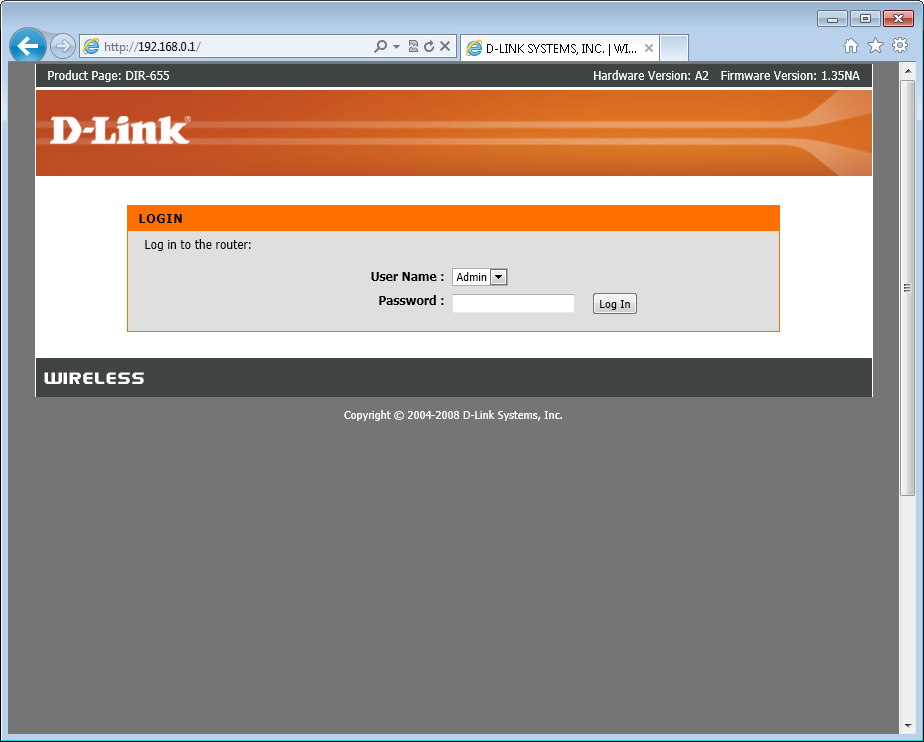
Once you've decided on a channel to switch to, you'll need to log in to your router's control panel and change the channel. To access the router's Web-based control panel, open a new window in your browser while you're connected to your router's wireless network and then type in its IP address (most commonly 192.168.1.1 or 192.168.0.1).

Repair Your Wi-Fi NetworkLogiin page for a D-Link router.
If you don't know your router's IP address, refer to the wireless connection details: In the lower-right corner of your Windows desktop, right-click the network icon and open the Network and Sharing Center. Select the wireless network that you wish to view, and click the Details button. You should now see the router's IP address listed as the Default Gateway.
Next, log in to your router control panel with the appropriate username and password. If you don't know the password, you may never have changed it--so try the default password, which you can look up on RouterPasswords.com. If your Internet service provider supplied your router, you may have to call your ISP for help in accessing the password.
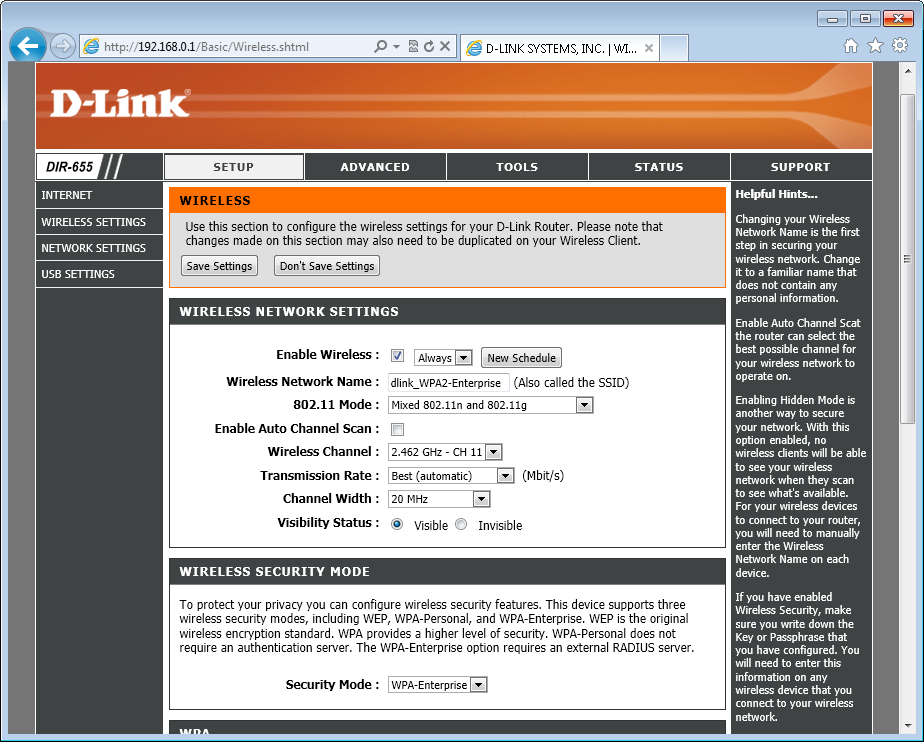
Repair Your Wi-Fi NetworkWireless settings on a D-Link router.
After logging in to the router, find the wireless settings and change the channel. Many routers have an automatic channel selection feature; if yours does, you can disable it and manually choose a channel. Again, for maximum performance, try to stick with channel 1 or 11. Once you've saved and applied the settings, your router may reboot; if so, reconnect and then check to see whether your connectivity problem persists. If so, you may need to try another channel.

Check and Reposition the Wireless Router

If the connection difficulty seems to arise only when you're rather far away from your wireless router, the problem could be that you're on the fringe of the router's coverage zone. The simple way to fix this is to buy a router with better range, but you can take some other steps before going to the trouble (and expense) of buying a new router. First, make sure that your router's antennas are securely attached and are positioned upright. Next, confirm that the router isn't buried or blocked behind large objects that might cause the signal to degrade faster than it normally would. For best results, place your router out in the open so the signal can travel freely.
Repair Your Wi-Fi NetworkFor best results, try moving your wireless router to the center of the room, with a clear line of sight to each of your wireless devices.
If you still aren't getting the Wi-Fi range you'd like, consider moving the router and the modem to a more central location within your desired coverage area. Of course, your placement options are limited: The router must be near another cable or telephone jack. Most cable modems can plug into any cable outlet, and DSL modems usually plug into other telephone jacks--but remember to switch out any filters that might be attached.

Restore the Router's Settings to the Factory Defaults

If you continue to have trouble getting various computers and devices to connect to your router, you can try restoring the router's settings to their factory default values. Unfortunately, this wipes out all of the settings, so you'll have to secure your home or office Wi-Fi again, and you may have to reconfigure your Internet connection settings. When you're ready to restore the router, find the small reset button or hole on the router's back, and use a pen or paperclip to press and hold the button for at least 10 seconds.

Reinstall the Wireless Adapter Driver or Software

If after completely resetting the router, you find that connection problems involving a single PC on your Wi-Fi network still haven't gone away, consider reinstalling the driver and/or software for the Wi-Fi adapter on that PC. The first step in this process is to download the latest network adapter driver or software from your computer manufacturer's website (or from the site of the adapter's manufacturer, if you purchased the adapter separately). From there, carefully follow the manufacturer's directions for reinstalling the software on your adapater. Reboot your PC afterward, and you should be good to go.

Upgrade the Router Firmware

If connection problems survive the reinstallation of your network adapter drivers, ityour router may sufer from a technical issue. Router vendors typically release firmware updates for their routers to fix known issues and sometimes even to add new features.
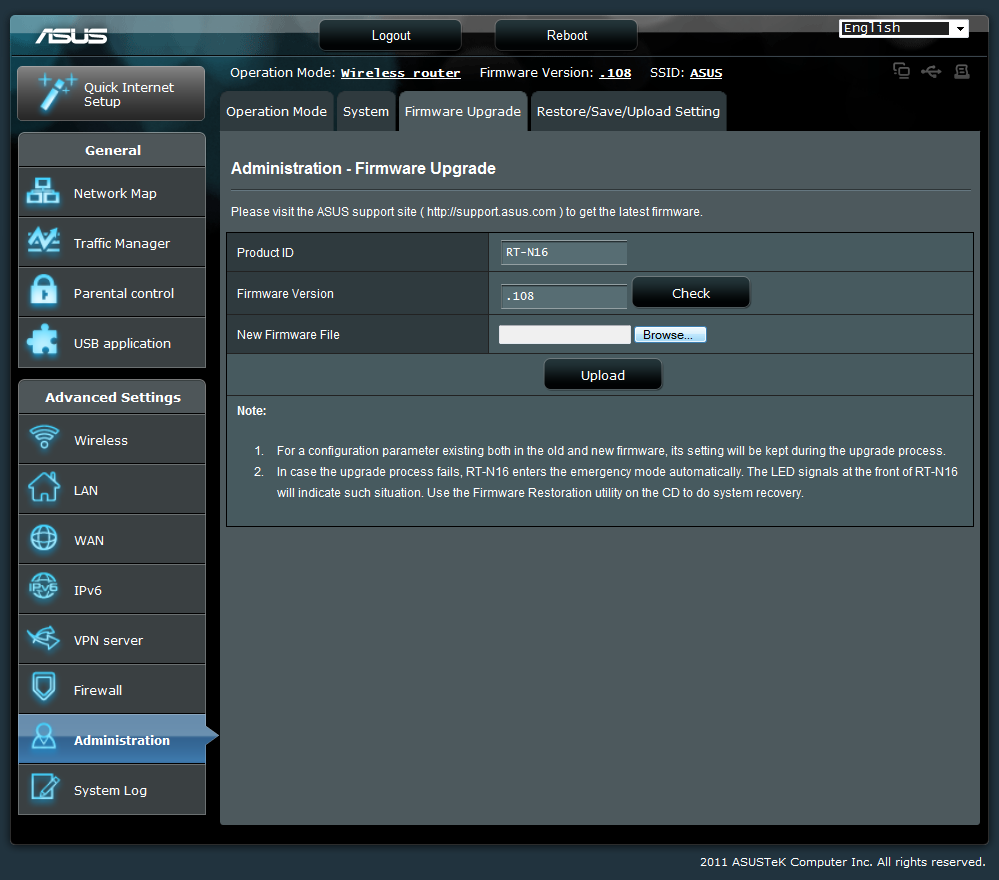
Repair Your Wi-Fi NetworkMost modern routers let you upgrade their firmware directly from the router control panel.
To see if there's a new firmware release for your router, first log into its web-based control panel (see the section above for help) and check which firmware version you have installed, usually shown on a system or status page. Next, navigate to the website of the router's manufacturer and check the support/downloads section for the newest firmware release for your particular model. Chances are you don't have the latest version; if so, download the latest firmware and follow the instructions on how to update it.
If that doesn't fix your problem, you could also try seeking out open-source router firmware and experimenting with using it to improve your Wi-Fi network. For more details on that process, check out our guide to enhancing your router with open-source software. If you try all these different solutions and your Wi-Fi network is still having problems, it may be time to invest in some new networking hardware (or just head on down to Starbuck's and borrow theirs.)
Ref:
Pcworld

Global TV Online Live Streaming

Global TV Online Live Streaming


Powered by Ticket Air Asia

RCTI TV Online Live Streaming

RCTI TV Online Live Streaming

Powered by iPhone 5 Bontang

iOS 6 untethered jailbreak takes limelight

iOS 6 untethered jailbreak takes limelight - It looks like the countdown towards an iOS 6 untethered jailbreak release date is starting to reach fever pitch. The feat hasn’t been achieved yet, but the possibility of a public iOS 6 untethered jailbreak download could be finalized at this week’s Hack in the Box event.

The conference is underway right now over in Malaysia and will continue on until the rest of the day. Security within mobile devices is going to be a key area of discussion during the event, but it looks like talk on an iOS 6 untethered jailbreak may be taking the limelight.

Earlier this week, a video was shown to the watching audience, revealing that a kernal exploit discovery had been made, which paved the way for iOS 6 jailbreak talk as a real possibility.
Unfortunately, it looks like those videos have been removed by the uploader, but one piece of information to share with you lies in the fact that there appears to be two main teams of ‘hackers’ who are thought to be hard at work on cracking the code towards an untethered jailbreak.

While it’s good in the fact that there is more chance of an untethered jailbreak being realized, it also raises the possibility of further delays, as the two teams battle it out for bragging rights on who gets to release the software first. For now though, the waiting game goes on and there’s nothing else that can be done except wait for a public download.

If you are patiently waiting for an untethered iOS 6 jailbreak at all costs, you may want to keep an eye on the Twitter account of Chpwn, who appears to have come closest to unlocking Apple’s security – so far though, he isn’t releasing it for public download.

Will we have an untethered jailbreak before the end of the week, or are you not so hopeful? We just hope that none of you have fell for the various scams that are still in circulation.

Source: product-reviews.net

Canon 40mm f2.8 STM Hands-on Review

Canon 40mm f2.8 STM Hands-on Review - We take a look at Canon's first pancake for the EOS system. It is tiny but does it have big performance?


Price reference: http://www.digitalrev.com/product/canon-ef-40mm-f-2/MTAwMDk0MQ_A_A

Canon 650D - T4i Hands-on Review

Canon 650D / T4i Hands-on Review - We review Canon's new 650D DSLR. It doesn't look like there are many updates - just how much different is it?


Pricing Reference:
http://www.digitalrev.com/product/canon-eos-650d-dslr-body/MTAwMDkzNg_A_A

Canon EOS M Mirrorless Camera Hands on First Look

Canon EOS M Mirrorless Camera Hands on First Look - Canon EOS M Mirrorless Camera Hands on First Look. The Canon EOS M is Canon's first mirrorless camera but inside it has much the same technology as the Canon 650D. The 18-million-pixel sensor, is the same CMOS device that supports the hybrid AF system for continuous focusing during Live View and video recording. Although the 3-inch 1,040,000-dot screen is fixed it is the same as the one in the 650D and is touch sensitive.

In this video Angela Nicholson takes a look at some pre-production samples. This is the new Canon mirrorless camera and EF-M 22mm f/2 Lens.